Lindsey Shepherd
About
Work
SAT® Knowledge and Skills Domain
Product Design, College Board
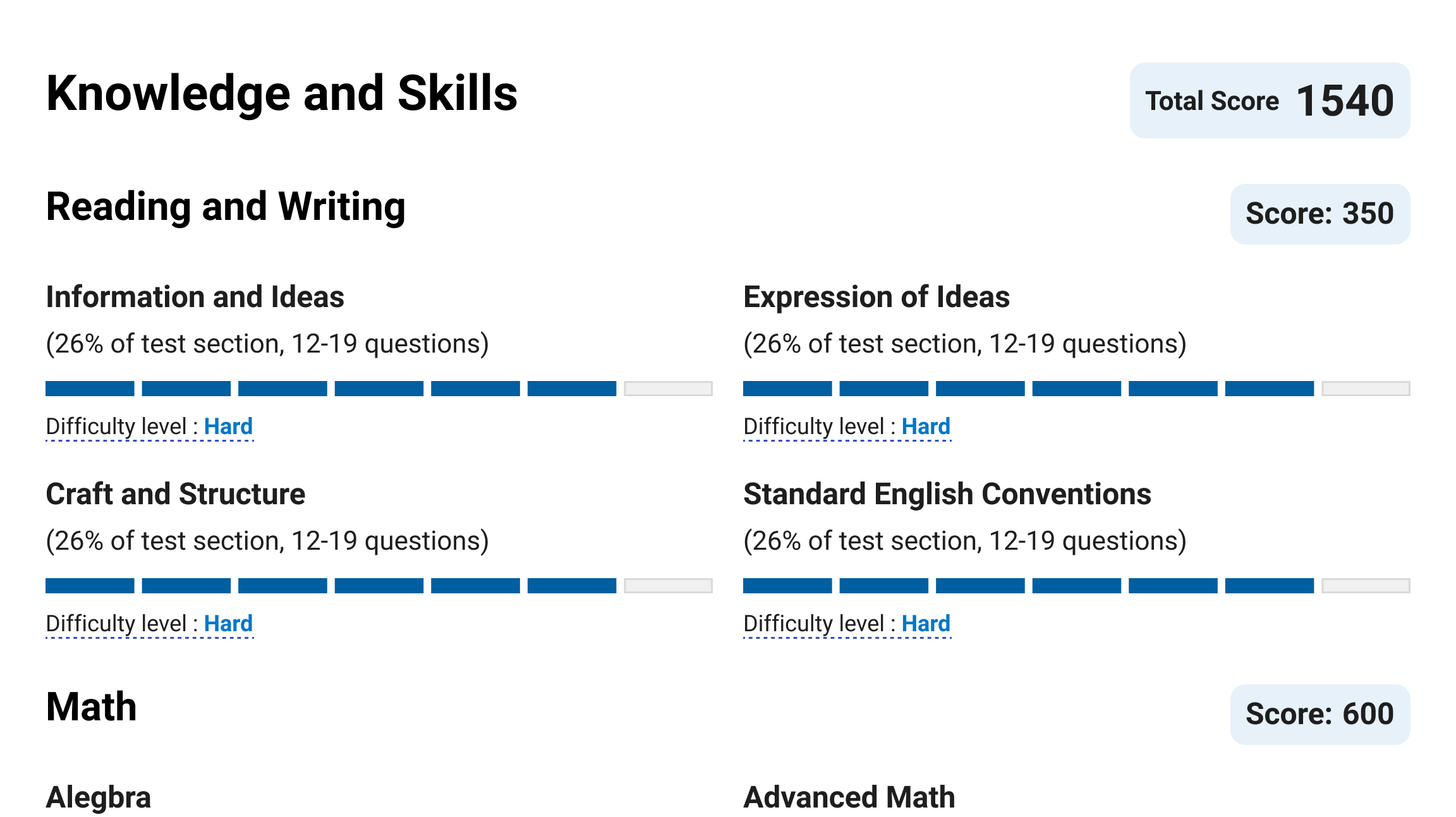
Table of Contents
Overview
Recurring feedback from students highlighted a need for more tools and direction to effectively use practice resources. Students expressed a desire to maximize their practice time by focusing on areas needing the most improvement. They sought guidance on how to achieve this.
Objective
To address student feedback by providing more prescriptive and granular details through the addition of Knowledge and Skills Domain (KSD) results within the My Practice ecosystem. This aims to help students focus on specific skills, thereby optimizing their practice time.
Implementation
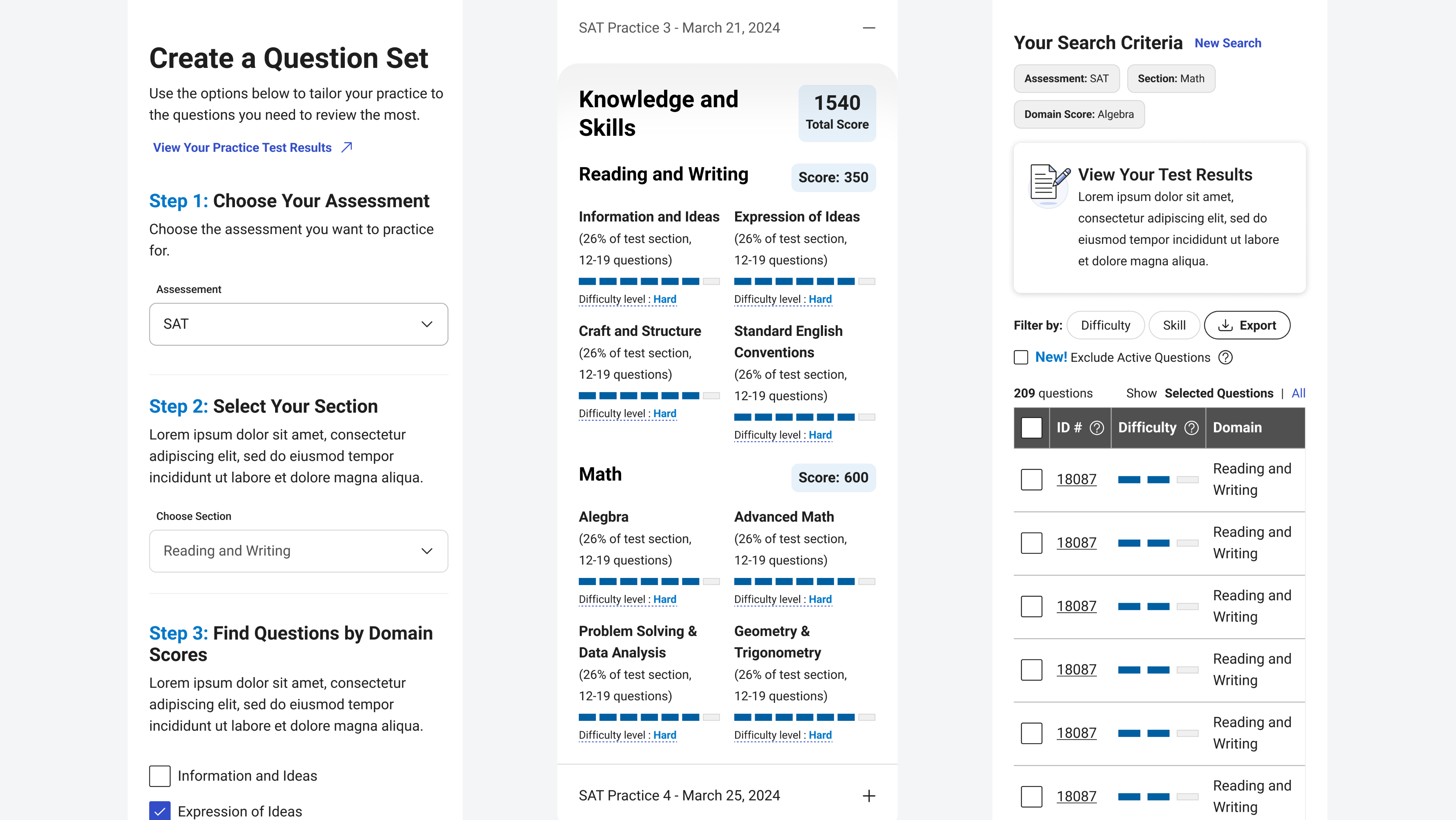
The Score Details Page now features a new section displaying eight Key Skill Domains (KSD) results for both the Reading/Writing (RW) and Math sections. These results are presented using a 7-segment line representation that aligns with operational reporting standards. Each domain's results include the percentage and number of questions answered, with difficulty levels aggregated into "Easy," "Medium," and "Hard" to match the filtering options in the Student Question Bank (SQB). Additionally, informational pop-up text and links to detailed KSD content on the Practice Vertical website have been added for enhanced clarity.
For Practice Specific Questions, information dynamically updates based on each tailored question. This includes details such as the KSD the question falls under, the student’s performance in that domain, and the difficulty level. Each question also features a direct link to the Student Question Bank for further review.
Lastly, the PDF Practice Score Report now includes KSD results for each test, along with a QR code that links directly to the new Practice Vertical website landing page.
Impact
The launch of the KSD within My Practice addresses student feedback by offering detailed insights into their performance. This initiative empowers students to make more informed decisions about their practice, ultimately enhancing their learning experience.
Lindsey Shepherd
Admissions Viewbook
Visual Design and Marketing
Knowledge and Skills Domain
Logo Design
About
Resume
Contact
SAT® Knowledge and Skills Domain
Product Design, College Board
Table of Contents
Overview
Recurring feedback from students highlighted a need for more tools and direction to effectively use practice resources. Students expressed a desire to maximize their practice time by focusing on areas needing the most improvement. They sought guidance on how to achieve this.
Objective
To address student feedback by providing more prescriptive and granular details through the addition of Knowledge and Skills Domain (KSD) results within the My Practice ecosystem. This aims to help students focus on specific skills, thereby optimizing their practice time.
Implementation
The Score Details Page now features a new section displaying eight Key Skill Domains (KSD) results for both the Reading/Writing (RW) and Math sections. These results are presented using a 7-segment line representation that aligns with operational reporting standards. Each domain's results include the percentage and number of questions answered, with difficulty levels aggregated into "Easy," "Medium," and "Hard" to match the filtering options in the Student Question Bank (SQB). Additionally, informational pop-up text and links to detailed KSD content on the Practice Vertical website have been added for enhanced clarity.
For Practice Specific Questions, information dynamically updates based on each tailored question. This includes details such as the KSD the question falls under, the student’s performance in that domain, and the difficulty level. Each question also features a direct link to the Student Question Bank for further review.
Lastly, the PDF Practice Score Report now includes KSD results for each test, along with a QR code that links directly to the new Practice Vertical website landing page.
Impact
The launch of the KSD within My Practice addresses student feedback by offering detailed insights into their performance. This initiative empowers students to make more informed decisions about their practice, ultimately enhancing their learning experience.
SAT® Knowledge and Skills Domain
Product Design, College Board
Table of Contents
Overview
Recurring feedback from students highlighted a need for more tools and direction to effectively use practice resources. Students expressed a desire to maximize their practice time by focusing on areas needing the most improvement. They sought guidance on how to achieve this.
Objective
To address student feedback by providing more prescriptive and granular details through the addition of Knowledge and Skills Domain (KSD) results within the My Practice ecosystem. This aims to help students focus on specific skills, thereby optimizing their practice time.
Implementation
The Score Details Page now features a new section displaying eight Key Skill Domains (KSD) results for both the Reading/Writing (RW) and Math sections. These results are presented using a 7-segment line representation that aligns with operational reporting standards. Each domain's results include the percentage and number of questions answered, with difficulty levels aggregated into "Easy," "Medium," and "Hard" to match the filtering options in the Student Question Bank (SQB). Additionally, informational pop-up text and links to detailed KSD content on the Practice Vertical website have been added for enhanced clarity.
For Practice Specific Questions, information dynamically updates based on each tailored question. This includes details such as the KSD the question falls under, the student’s performance in that domain, and the difficulty level. Each question also features a direct link to the Student Question Bank for further review.
Lastly, the PDF Practice Score Report now includes KSD results for each test, along with a QR code that links directly to the new Practice Vertical website landing page.
Impact
The launch of the KSD within My Practice addresses student feedback by offering detailed insights into their performance. This initiative empowers students to make more informed decisions about their practice, ultimately enhancing their learning experience.