Lindsey Shepherd
About
Work
Search Utility
UX/UI Design, NC State University
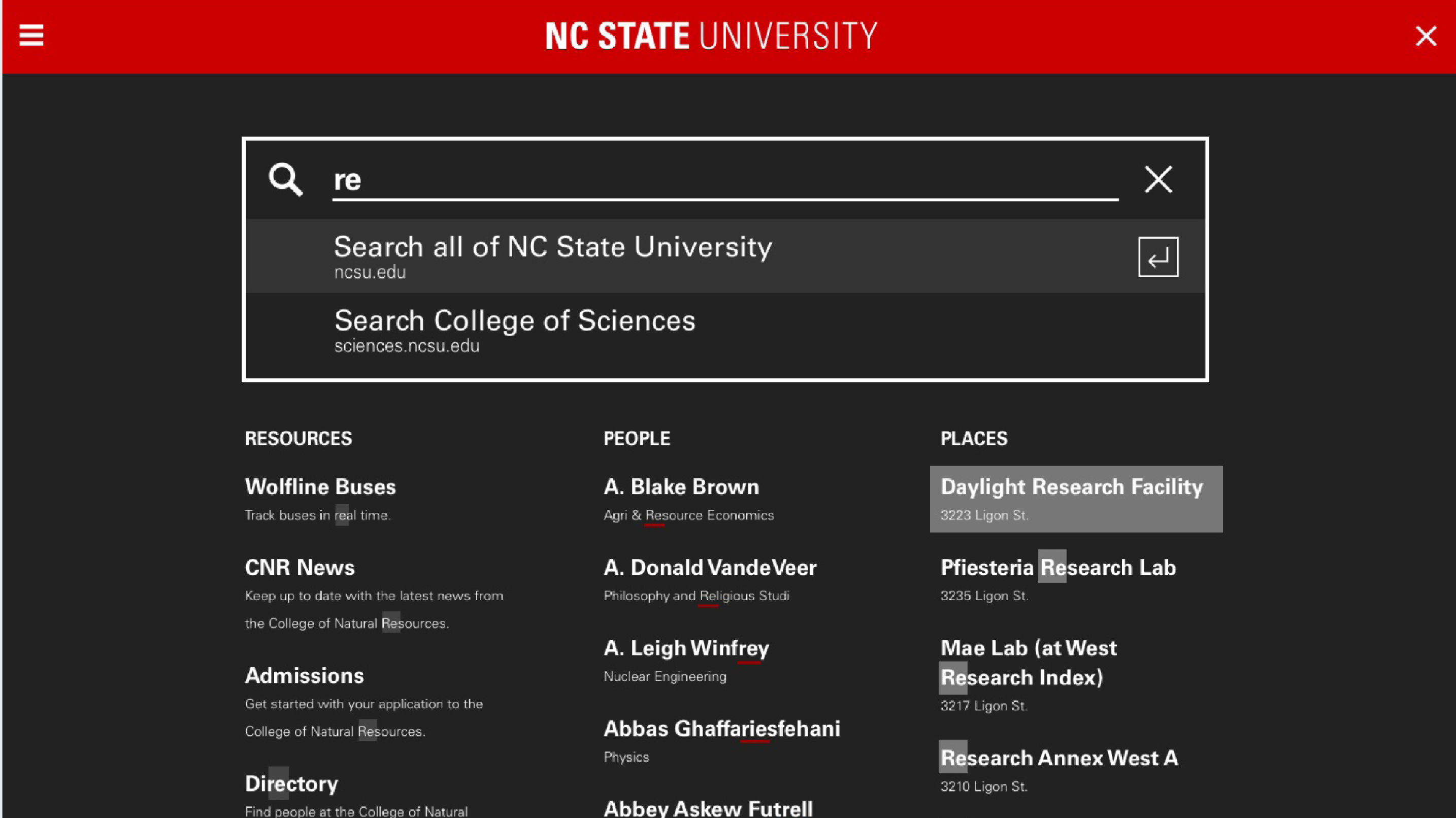
Table of Contents
Overview
NC State is modernizing its website’s search and resources experience by introducing smart search capabilities. The goal is to provide users with faster, more accurate, and more intuitive access to the content they need.
The legacy search utility, last updated several years ago, lacked the sophistication and flexibility required by today’s users. To address this, we partnered with Algolia to build a robust, customizable search solution that meets the evolving needs of students, faculty, and staff across the university.
This redesign is being implemented in phases, with phase one focused on restructuring the search and resources dropdown and improving basic functionality. Phase two will roll out enhanced smart search features over the coming months.
My Role
As the Senior UX/UI Designer on this project, I collaborated closely with content strategists, web developers, and fellow designers to ensure the new experience was both user-friendly and visually aligned with NC State’s digital identity.
My contributions included:
- Leading user research efforts to understand needs and behaviors
- Designing and iterating on wireframes and high-fidelity mockups
- Prototyping interactions and conducting usability testing
- Mapping and refining the full user experience journey
User Journey Mapping
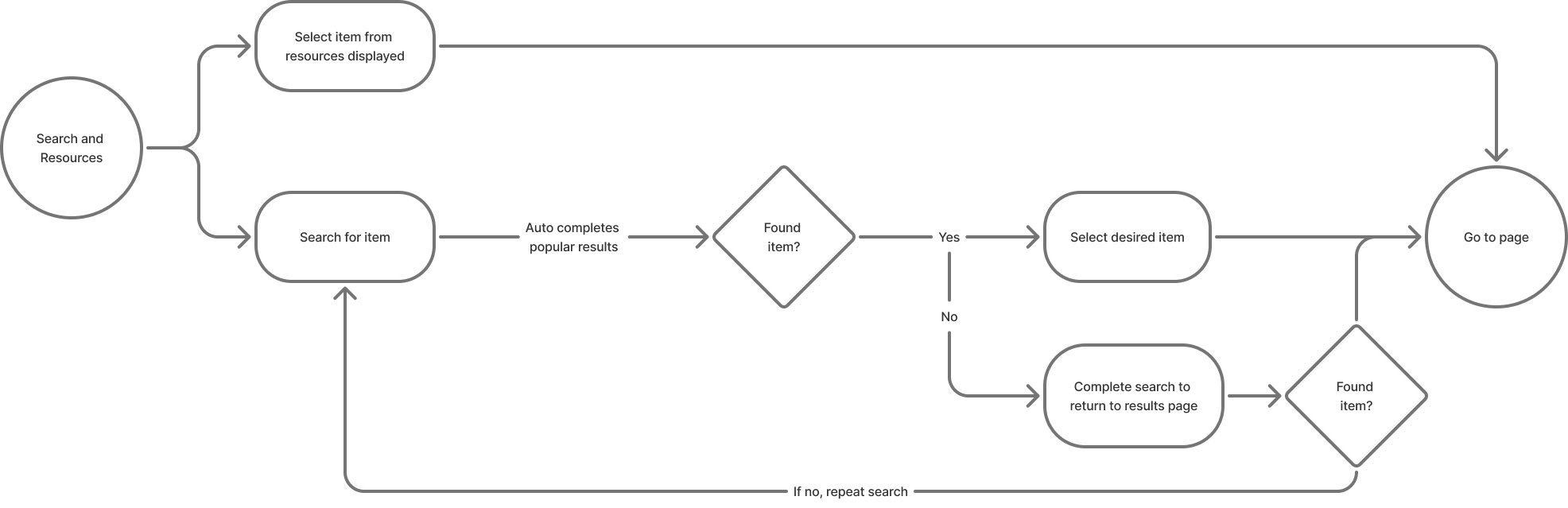
We began by mapping out key user journeys to better understand how individuals engage with the current search functionality. These collaborative workshops helped identify friction points and inspired improvements in interface structure and content prioritization.
Wireframing and Prototyping
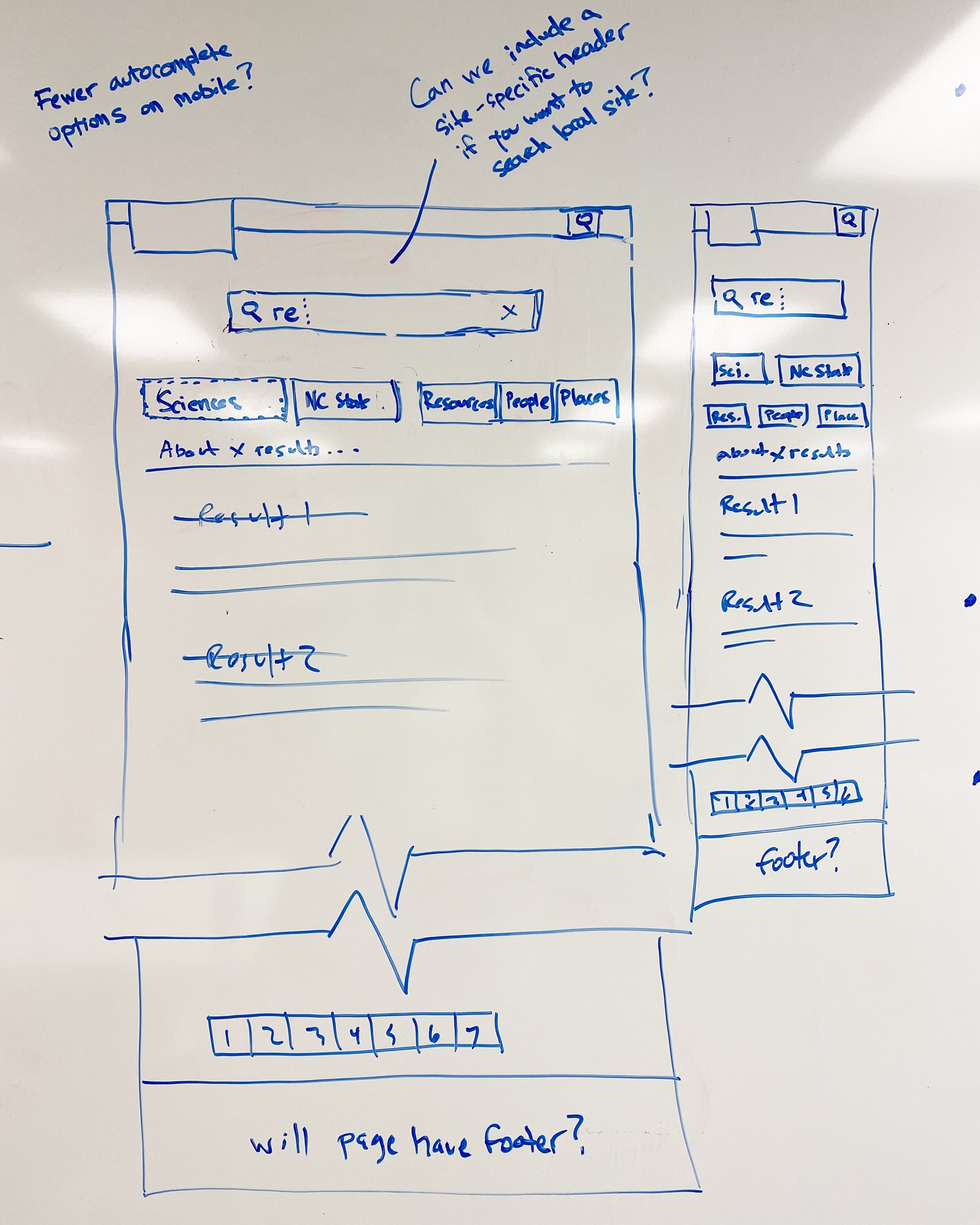
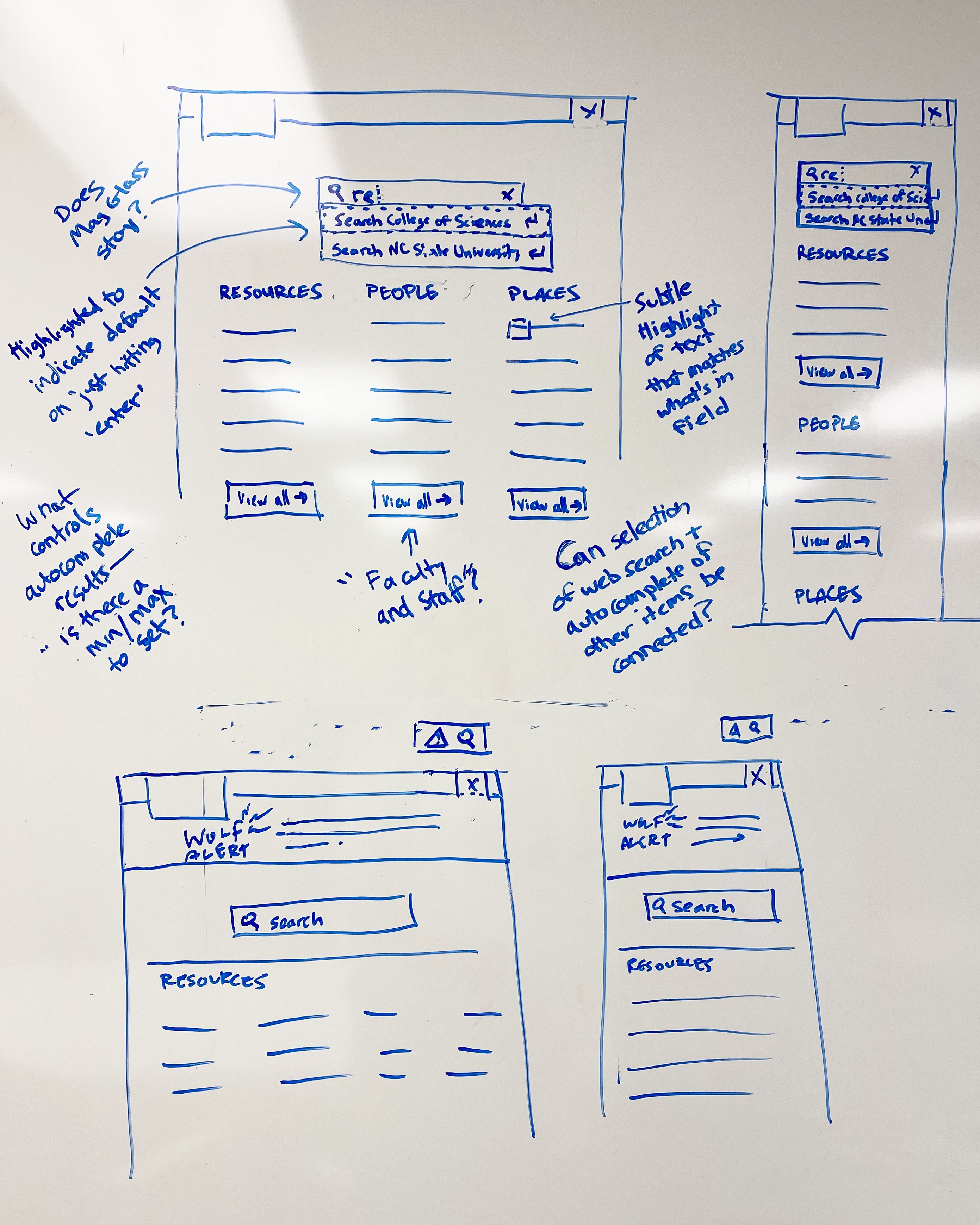
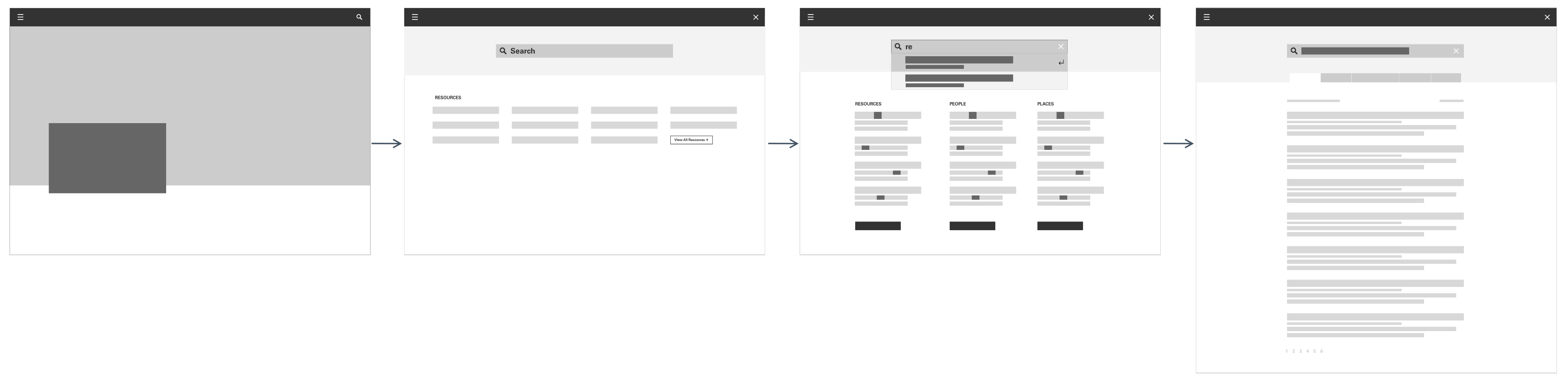
Initial concepts were sketched and whiteboarded as low-fidelity wireframes, stripped of color and embellishment to keep the focus on structure and flow. These wireframes helped the team visualize user paths and test assumptions early.
High-Fidelity Design and Iteration
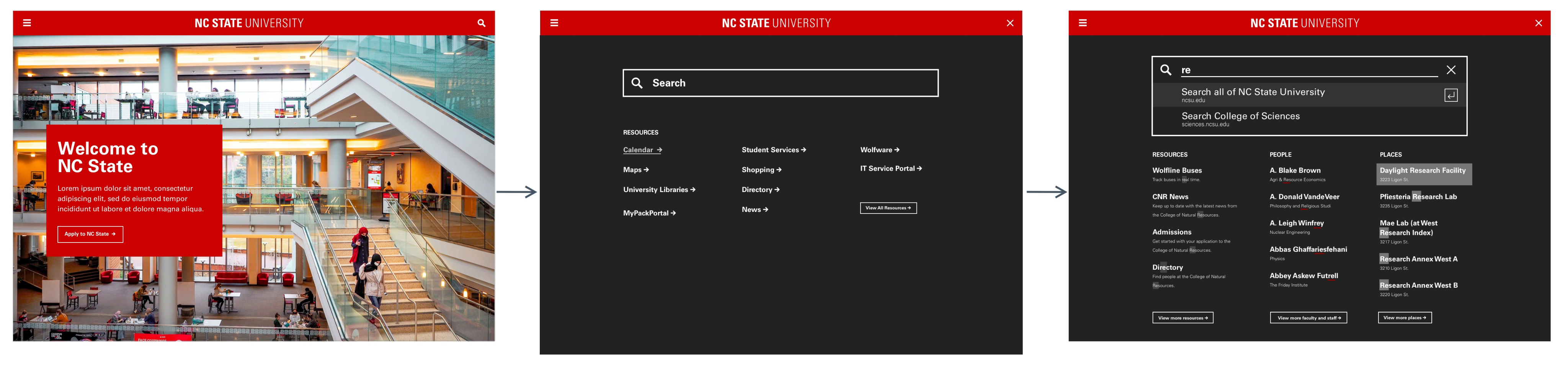
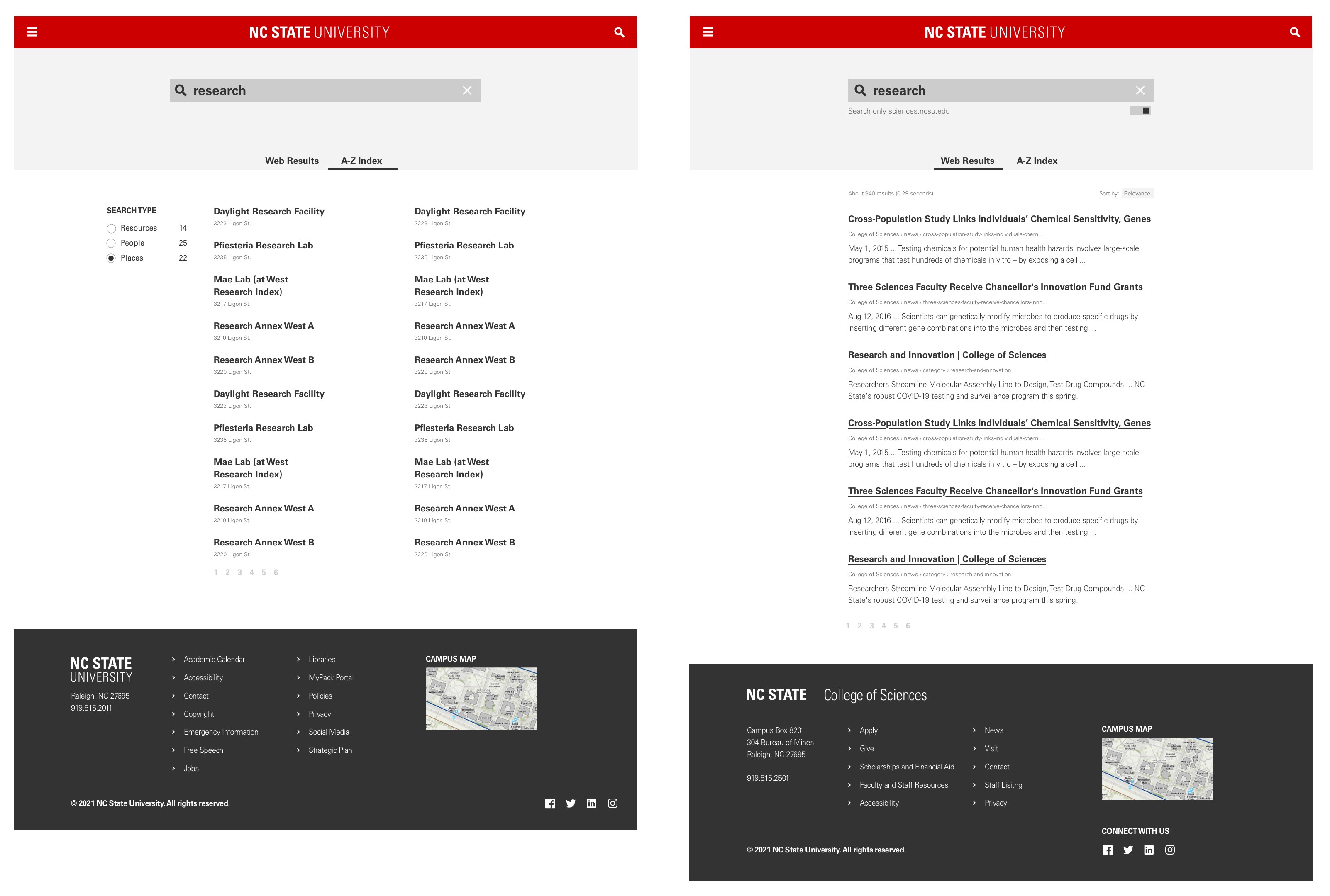
Building on the feedback from wireframe reviews, I developed a set of polished, high-fidelity design options. These mockups incorporated university branding, accessibility best practices, and responsive behaviors. Through iterative feedback cycles with stakeholders and users, we refined the visuals and interactions.
Lindsey Shepherd
Admissions Viewbook
Visual Design and Marketing
Knowledge and Skills Domain
Logo Design
About
Resume
Contact
Search Utility
UX/UI Design, NC State University
Table of Contents
Overview
NC State is modernizing its website’s search and resources experience by introducing smart search capabilities. The goal is to provide users with faster, more accurate, and more intuitive access to the content they need.
The legacy search utility, last updated several years ago, lacked the sophistication and flexibility required by today’s users. To address this, we partnered with Algolia to build a robust, customizable search solution that meets the evolving needs of students, faculty, and staff across the university.
This redesign is being implemented in phases, with phase one focused on restructuring the search and resources dropdown and improving basic functionality. Phase two will roll out enhanced smart search features over the coming months.
My Role
As the Senior UX/UI Designer on this project, I collaborated closely with content strategists, web developers, and fellow designers to ensure the new experience was both user-friendly and visually aligned with NC State’s digital identity.
My contributions included:
- Leading user research efforts to understand needs and behaviors
- Designing and iterating on wireframes and high-fidelity mockups
- Prototyping interactions and conducting usability testing
- Mapping and refining the full user experience journey
User Journey Mapping
We began by mapping out key user journeys to better understand how individuals engage with the current search functionality. These collaborative workshops helped identify friction points and inspired improvements in interface structure and content prioritization.
Wireframing and Prototyping
Initial concepts were sketched and whiteboarded as low-fidelity wireframes, stripped of color and embellishment to keep the focus on structure and flow. These wireframes helped the team visualize user paths and test assumptions early.
High-Fidelity Design and Iteration
Building on the feedback from wireframe reviews, I developed a set of polished, high-fidelity design options. These mockups incorporated university branding, accessibility best practices, and responsive behaviors. Through iterative feedback cycles with stakeholders and users, we refined the visuals and interactions.
Search Utility
UX/UI Design, NC State University
Table of Contents
Overview
NC State is modernizing its website’s search and resources experience by introducing smart search capabilities. The goal is to provide users with faster, more accurate, and more intuitive access to the content they need.
The legacy search utility, last updated several years ago, lacked the sophistication and flexibility required by today’s users. To address this, we partnered with Algolia to build a robust, customizable search solution that meets the evolving needs of students, faculty, and staff across the university.
This redesign is being implemented in phases, with phase one focused on restructuring the search and resources dropdown and improving basic functionality. Phase two will roll out enhanced smart search features over the coming months.
My Role
As the Senior UX/UI Designer on this project, I collaborated closely with content strategists, web developers, and fellow designers to ensure the new experience was both user-friendly and visually aligned with NC State’s digital identity.
My contributions included:
- Leading user research efforts to understand needs and behaviors
- Designing and iterating on wireframes and high-fidelity mockups
- Prototyping interactions and conducting usability testing
- Mapping and refining the full user experience journey
User Journey Mapping
We began by mapping out key user journeys to better understand how individuals engage with the current search functionality. These collaborative workshops helped identify friction points and inspired improvements in interface structure and content prioritization.
Wireframing and Prototyping
Initial concepts were sketched and whiteboarded as low-fidelity wireframes, stripped of color and embellishment to keep the focus on structure and flow. These wireframes helped the team visualize user paths and test assumptions early.
High-Fidelity Design and Iteration
Building on the feedback from wireframe reviews, I developed a set of polished, high-fidelity design options. These mockups incorporated university branding, accessibility best practices, and responsive behaviors. Through iterative feedback cycles with stakeholders and users, we refined the visuals and interactions.